Understand the differences between CO2, fiber, and diode lasers. Learn which technology suits your materials, budget, and applications to make the right choice for your workshop or business.
Three Technologies, Different Strengths
Not all lasers are created equal. CO2, fiber, and diode lasers use different technologies to generate their beams, and each excels at different applications. Choosing the wrong type means frustration and wasted money—the right choice means excellent results.
This guide cuts through the confusion to help you understand which laser technology fits your specific needs.
CO2 Lasers: The Organic Material Specialists
How They Work
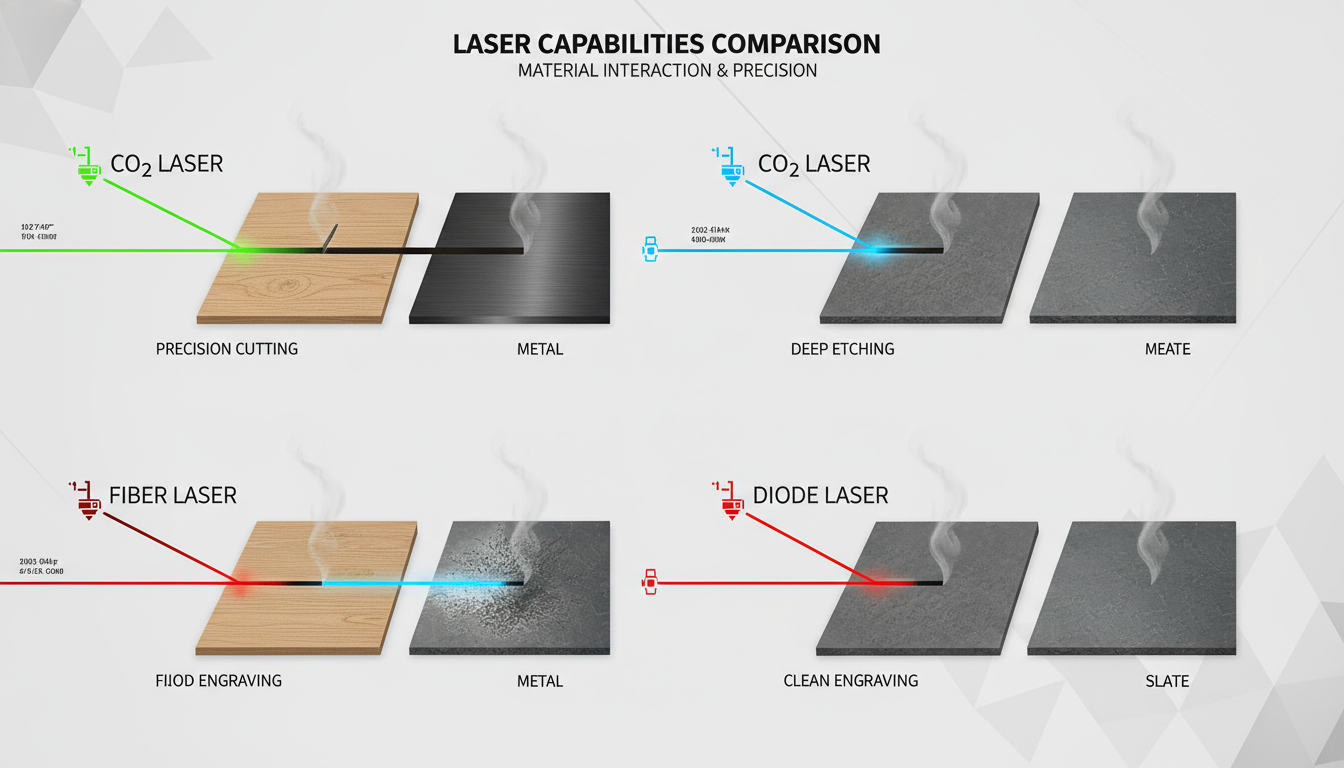
CO2 lasers use a gas mixture (carbon dioxide, nitrogen, hydrogen, helium) excited by electrical discharge to produce infrared light at 10.6 micrometers wavelength. This wavelength is readily absorbed by organic materials, making it ideal for cutting and engraving wood, acrylic, leather, fabric, and paper.
What CO2 Lasers Do Best
- Wood: Excellent cutting and engraving with characteristic dark edges
- Acrylic: Polished, flame-finished edges; frosted white engraving
- Leather: Clean cuts, branded-look engraving
- Fabric: Sealed edges that don't fray
- Paper/cardboard: Intricate detail cutting
- Rubber: Custom stamps and gaskets
- Glass: Surface engraving (not cutting)
What CO2 Lasers Can't Do
- Cut metal (beam reflects off metal surfaces)
- Engrave bare metal (except with marking compounds)
- Work with reflective materials effectively
Typical CO2 Laser Specs
- Power range: 40W to 200W+ (glass tubes), higher for RF tubes
- Cutting thickness: Up to 25mm+ for wood/acrylic (depends on wattage)
- Price range: $500 to $50,000+ depending on size and quality
CO2 Laser Costs
Initial investment: Medium to high, depending on size and power
Operating costs: Moderate—tube replacement every 3,000-10,000 hours ($200-$1,000 depending on power), water chiller electricity
Maintenance: Mirror and lens cleaning, alignment checks, cooling system maintenance
Fiber Lasers: The Metal Specialists
How They Work
Fiber lasers use optical fibers doped with rare earth elements (typically ytterbium) to generate light at around 1.06 micrometers wavelength. This wavelength is absorbed well by metals, making fiber lasers the choice for metal cutting and marking.
What Fiber Lasers Do Best
- Steel: Cutting and marking
- Stainless steel: Excellent cutting and engraving
- Aluminum: Cutting and marking
- Brass and copper: Marking (cutting requires higher power)
- Titanium: Cutting and marking
- Precious metals: Jewelry marking
What Fiber Lasers Can't Do Well
- Cut wood (burns rather than cuts cleanly)
- Cut acrylic (causes flaming and poor edge quality)
- Engrave wood with good contrast
- Work with most organic materials
Typical Fiber Laser Specs
- Power range: 20W to 6,000W+ for industrial cutting
- Marking lasers: 20W-100W common for engraving/marking
- Cutting lasers: 500W-6,000W+ for sheet metal cutting
- Price range: $3,000-$15,000 for markers; $30,000-$300,000+ for cutting systems
Fiber Laser Costs
Initial investment: High, especially for cutting systems
Operating costs: Low—fiber sources last 50,000-100,000 hours, minimal consumables
Maintenance: Very low—no mirrors to align, sealed beam path
Diode Lasers: The Budget Entry Point
How They Work
Diode lasers use semiconductor diodes (similar to LED technology) to generate light, typically in the 400-450nm (blue) or 808nm-980nm (infrared) range. They're the simplest and cheapest laser technology.
What Diode Lasers Do Best
- Light engraving: Surface engraving on wood, leather, anodized aluminum
- Thin material cutting: Paper, thin plywood, craft foam
- Learning: Excellent for understanding laser basics
- Light hobby use: Small projects, occasional use
Limitations of Diode Lasers
- Low power limits cutting capability (typically 3-6mm wood maximum)
- Very slow compared to CO2
- Can't cut acrylic well (wrong wavelength)
- Limited engraving depth
- Not suitable for production work
Typical Diode Laser Specs
- Power range: 5W to 40W (optical output, not input power)
- Cutting capability: 3-6mm wood with multiple passes
- Price range: $200-$1,500
Diode Laser Costs
Initial investment: Low
Operating costs: Very low
Maintenance: Minimal—diode modules are replaceable
Head-to-Head Comparison
FactorCO2FiberDiode Best forOrganic materialsMetalsLight hobby Wood cuttingExcellentPoorLimited Acrylic cuttingExcellentPoorVery poor Metal cuttingNoExcellentNo Metal markingWith compoundsDirectLimited Leather/fabricExcellentPoorLight use Cutting speedFastVery fast (metal)Slow Initial costMedium-HighHighLow Operating costMediumLowVery low MaintenanceModerateLowLow ComplexityMediumMedium-HighLowMaterial Compatibility Detailed
Wood
- CO2: Excellent—clean cuts, nice dark edges, detailed engraving
- Fiber: Poor—burns and chars, doesn't cut cleanly
- Diode: Possible but slow, limited thickness, lower quality
Acrylic
- CO2: Excellent—polished edges, frosted engraving
- Fiber: Very poor—catches fire, melts, dangerous
- Diode: Very poor—wrong wavelength, doesn't absorb well
Metals
- CO2: Cannot cut or engrave bare metal (reflects beam)
- Fiber: Excellent—designed specifically for metal
- Diode: Very limited marking on some metals
Leather
- CO2: Excellent—clean cuts, beautiful branded-look engraving
- Fiber: Poor—wrong wavelength, burns rather than engraves cleanly
- Diode: Light engraving possible, cutting limited
Fabric
- CO2: Excellent—sealed edges, clean cuts
- Fiber: Poor for organic fabrics
- Diode: Limited to very thin, light-colored fabrics
Cost Comparison (5-Year Total)
CO2 Laser (80W Mid-Size)
- Machine: $5,000-$10,000
- Chiller: $500-$1,500
- Exhaust: $200-$500
- Tube replacement (2x): $400-$800
- Maintenance supplies: $500
- 5-year total: $6,600-$13,300
Fiber Laser (30W Marker)
- Machine: $4,000-$8,000
- Extraction: $300-$800
- Maintenance: minimal
- 5-year total: $4,300-$8,800
Diode Laser (10W)
- Machine: $300-$800
- Enclosure: $100-$300
- Extraction: $100-$200
- Replacement modules: $100-$200
- 5-year total: $600-$1,500
Speed and Precision Comparison
Cutting Speed (6mm Wood Example)
- CO2 (80W): 15-25mm/sec single pass
- Fiber: N/A (not suitable for wood)
- Diode (10W): 2-4mm/sec, multiple passes needed
Engraving Speed (Wood)
- CO2: 300-600mm/sec possible
- Fiber: Not recommended
- Diode: 50-150mm/sec typical
Precision
- CO2: ±0.1mm typical, ±0.01mm high-end
- Fiber: ±0.01mm typical (excellent for fine marking)
- Diode: ±0.1-0.2mm typical
Maintenance and Longevity
CO2 Lasers
- Mirror and lens cleaning (weekly/monthly)
- Alignment checks (occasionally)
- Tube replacement (3,000-10,000 hours)
- Chiller maintenance
- Exhaust system maintenance
Fiber Lasers
- Minimal maintenance—sealed beam path
- Protective lens replacement (as needed)
- Source lasts 50,000-100,000 hours
- Most reliable of the three types
Diode Lasers
- Lens cleaning
- Diode module replacement (2,000-10,000 hours depending on quality)
- Simple systems mean less to go wrong
When to Choose CO2
CO2 lasers are the right choice when you're working with:
- Wood (cutting or engraving)
- Acrylic (cutting or engraving)
- Leather (cutting or engraving)
- Fabric and textiles
- Paper and cardboard
- Rubber stamps
- Glass engraving
- Most non-metal materials
Typical CO2 users: Sign shops, maker businesses, custom gift shops, fabric/textile producers, woodworkers, prototype shops, schools, makerspaces.
When to Choose Fiber
Fiber lasers are the right choice when you're working with:
- Steel and stainless steel cutting
- Metal engraving and marking
- Jewelry marking
- Industrial part marking
- Medical device marking
- Electronics marking
Typical fiber users: Metal fabricators, machine shops, jewelry manufacturers, industrial marking operations, aerospace, medical device manufacturers.
When to Choose Diode
Diode lasers make sense when:
- You're on a tight budget
- You're learning and experimenting
- You only do occasional light projects
- Speed doesn't matter
- You're cutting thin materials only
- It's purely a hobby
Typical diode users: Hobbyists, students, occasional crafters, those testing whether laser work is for them.
Hybrid Considerations
Some shops need both CO2 and fiber capabilities. In these cases, you have options:
Two Separate Machines
- Best performance for each material type
- More expensive
- More space required
- Most flexibility
Hybrid Machines
Some manufacturers offer machines with both CO2 and fiber sources. These can switch between technologies but typically:
- Cost more than either individual machine
- May compromise on work area
- Add complexity
- Make sense for specific applications
Get Expert Guidance
The right laser technology depends entirely on what you plan to make. Starting with the wrong type is expensive and frustrating.
Contact our team to discuss your specific applications. We'll help you understand which laser technology fits your needs and budget—no pressure, just honest guidance.
Browse our laser equipment to see CO2 options available with full US support.
Ready to get started?
Browse our equipment inventory or get in touch with our team for expert advice on your next project.